
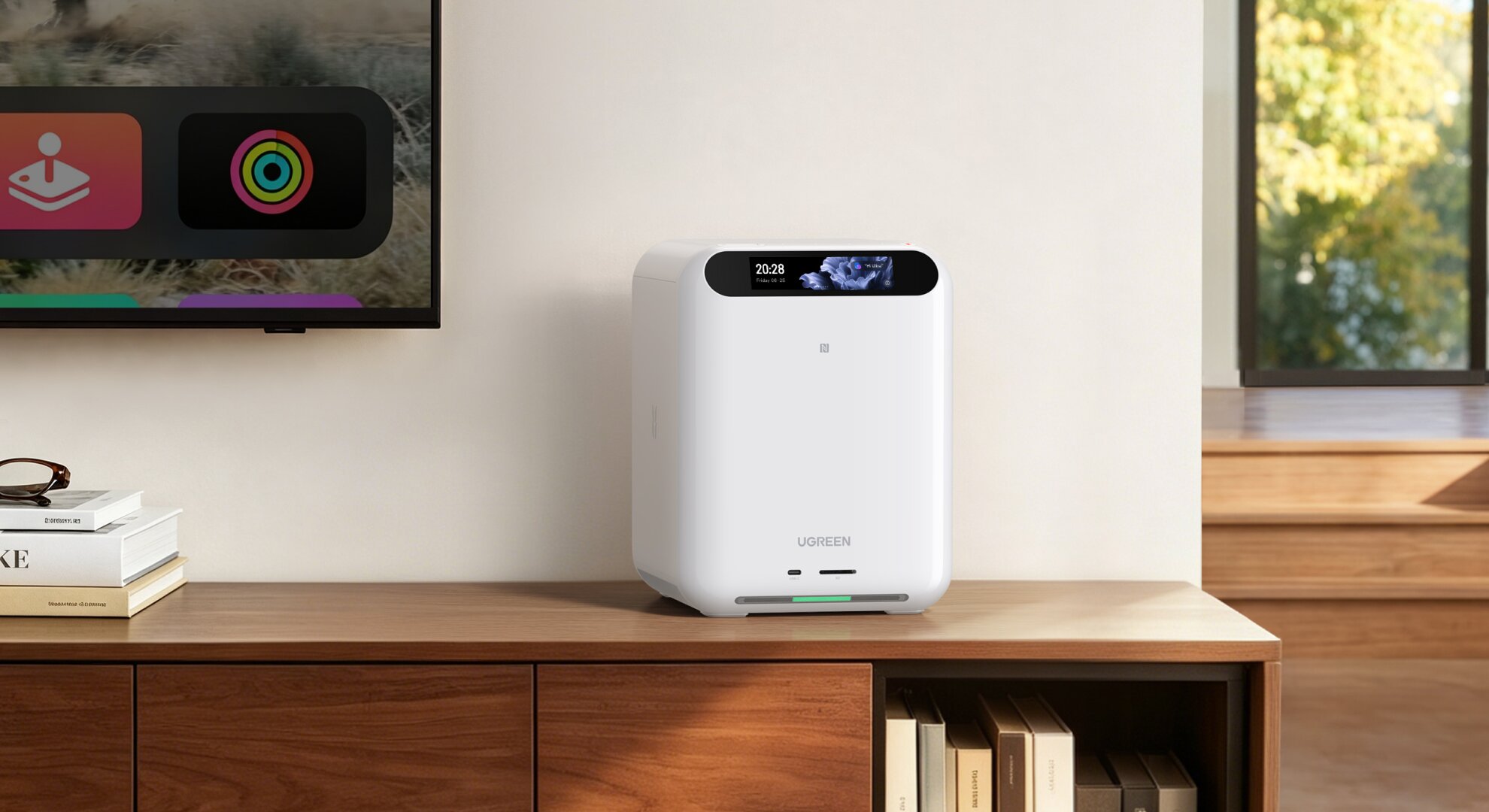
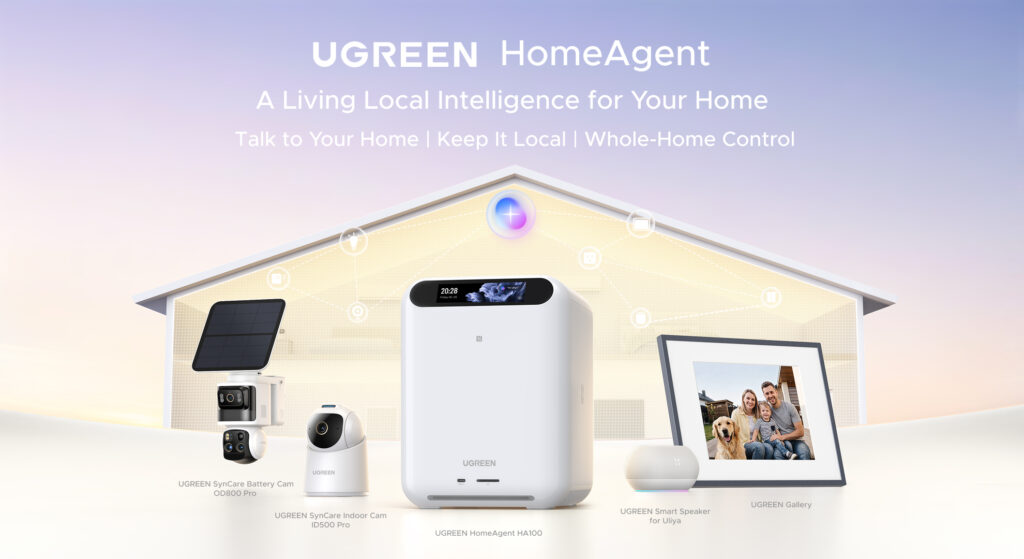
UGREEN has spent the past several years building its reputation around storage, networking accessories, and NAS (Network Attached Storage) systems. With the HomeAgent HA100, the company is attempting something considerably more ambitious: combining a NAS, network video recorder, smart-home hub, and local AI computing platform into a single device designed to manage a connected household.
For those who want a centralized system without researching, purchasing, and configuring several different devices, this approach makes sense. The HA100 brings household files, security cameras, and compatible smart-home devices together under one platform, with an AI assistant called Uliya providing a more natural way to interact with everything.
You may already be familiar with assistants such as Amazon Alexa or Google Assistant. The difference is that HomeAgent places a greater emphasis on local processing, keeping supported household data and AI workloads on your own hardware rather than relying entirely on cloud services. This is an appealing proposition, especially as concerns about privacy, recurring subscriptions, and dependence on online services continue to grow.
UGREEN provided us with the HomeAgent HA100, SynCare Indoor Cam ID500 Pro, and SynCare PoE Cam OD600 Pro for testing and evaluation; our review is unbiased and honest. This isn’t a full review, but an early hands-on evaluation.
The HomeAgent HA100 and its accompanying ecosystem are still in development, with several features either limited or not yet available in the current software. As UGREEN continues refining its hardware, firmware, and software, certain functions, specifications, and overall performance may change before the products reach their final retail release.
With that in mind, we’re focusing on what the HA100 currently offers, how the two SynCare cameras integrate with the system, and where the experience still needs improvement. While the concept is promising, combining several technologies into one device doesn’t automatically make it better than using dedicated solutions.
The question is whether HomeAgent can deliver a genuinely useful local AI platform or whether buyers are paying a premium for capabilities that still need time to mature.
What Is the UGREEN HomeAgent HA100?
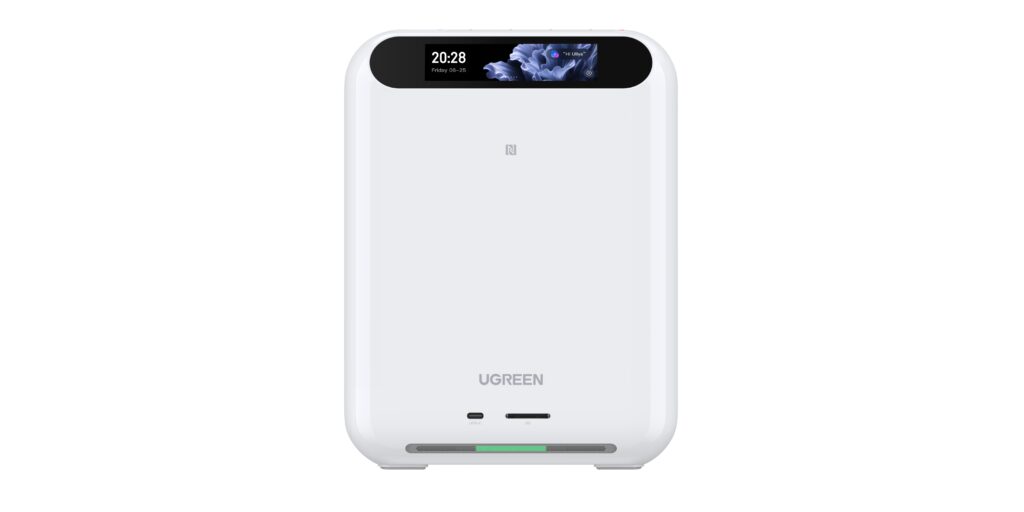
The UGREEN HomeAgent HA100 is an AI-powered home hub built around the company’s UGOS Pro operating system. It combines traditional network storage, video surveillance, and smart-home management, with dedicated hardware to run AI workloads locally.
A NAS is essentially a computer connected to your network that provides centralized storage for files, photographs, backups, and other data. An NVR, or Network Video Recorder, serves a different purpose: recording and managing footage from compatible security cameras.
The HA100 combines both functions, adding AI capabilities intended to make household information easier to manage and interact with. Instead of manually searching through recordings or navigating several apps, users can issue supported voice commands through Uliya.
UGREEN calls this an AIoT ecosystem, short for Artificial Intelligence of Things. The goal is to simplify home management, especially for users who want a pre-built solution rather than assembling a system from separate hardware and software.
However, there are limitations to consider. The current software supports specific commands and integrations, so Uliya can’t interpret every conversational request or control every smart-home device. Future software updates are expected to add more advanced functionality.
For now, the HA100 is better viewed as a foundation for local AI-powered home management rather than a fully autonomous household assistant.
The HA100’s Spec
One of the HA100’s biggest selling points is its ability to process supported AI tasks locally. Instead of relying entirely on remote servers, the system performs compatible AI workloads on its own hardware.
UGREEN has equipped the HA100 with the following specifications:
| Component | Specification |
|---|---|
| Processor | Rockchip RK3588 |
| Memory | 16GB LPDDR5 |
| System storage | 64GB eMMC |
| AI performance | 26 TOPS (6 + 20 TOPS) |
| AI accelerator | RK1828 / T20 accelerator |
| AI model storage | M.2 NVMe, PCIe 3.0 x1 |
| Drive bays | 2 NAS + 1 surveillance |
| Network | 2.5GbE Ethernet |
| Camera connectivity | 4 PoE ports |
The RK3588 is a system-on-chip (SoC), which combines several computing components into one package, including CPU cores, graphics processing, and a neural processing unit (NPU) designed to accelerate certain AI tasks.
The advertised 26 TOPS combines approximately 6 TOPS from the RK3588’s built-in NPU with an additional 20 TOPS from the dedicated AI accelerator. TOPS stands for trillions of operations per second, a theoretical measure of AI processing capacity.
However, higher TOPS doesn’t automatically mean faster responses or better AI results. Actual performance depends on the model used, available memory, software optimization, and task complexity.
The HA100 comes with its AI accelerator card pre-installed, although the accompanying software still requires configuration. UGREEN’s setup process includes installing the T20 AI Accelerator Card Toolkit and Model Management components, which let the system manage compatible AI models.
During my early testing, Qwen3.5 4B was the default local language model, and its responsiveness was encouraging for the tasks I tried. However, I need more extensive testing before I can conclude its overall speed, accuracy, and limitations. Other compatible models may also work, but their performance will vary depending on configuration and hardware support.
The HA100 additionally includes an M.2 NVMe slot for storing AI models. Adding a compatible SSD provides more model storage but doesn’t directly increase the processor’s computing power.
What interests me most is the possibility of running AI workloads without needing a dedicated computer or building a separate AI server. That could make local AI more accessible, although users who want to experiment extensively with models will still need to understand the hardware and software limitations. Especially when buying the entry-level model.
Uliya At Your Command
UGREEN describes the HA100 as an agentic AI hub. Unlike a conventional chatbot that primarily answers questions, agentic AI is meant to understand requests and interact with connected systems to complete tasks.
For example, instead of opening an application to control a light, users can ask Uliya to turn it on. The assistant can also retrieve information from supported surveillance events or trigger predefined smart-home routines.
However, the current implementation is more limited than the broader concept suggests. So while she can do a few things here and there, I can’t fully use her for what she may be capable of. She can also respond to anyone’s commands, which I hope we can configure later to listen only to certain voices, not just anyone.
According to UGREEN’s reviewer documentation, initial smart-home commands primarily support lights, sensors, switches, and curtains. Uliya also works best with direct instructions rather than complicated conversational requests.
The same applies to surveillance searches. Users can ask about specific events, but queries generally require enough information about the time, location, object, or action for the assistant to identify the correct recording.
This distinction matters because natural-language control isn’t necessarily the same as advanced reasoning. An assistant that understands a command to turn on a light may not understand an indirect statement such as a room feeling too dark.
For now, we have to wait for future updates, and as of this writing, we can only use it for limited commands, such as music and security cameras.
Local Storage, Privacy, and Network Connectivity
Privacy is another important part of UGREEN’s HomeAgent concept. I am glad they understand the current consumer landscape.
The HA100 is designed to keep supported files, photographs, surveillance footage, and AI processing on the local device. This reduces dependence on cloud-based storage and processing services and eliminates recurring cloud storage fees for supported local functions.
However, local processing does not mean the device never communicates with external services.
UGREEN’s documentation explains that certain functions, including initial activation, model downloads, authentication, updates, and remote access, may require an internet connection. Optional diagnostic uploads and certain event notifications may also involve external services.
For example, enabling text and thumbnail notifications can upload event snapshots to UGREEN’s cloud infrastructure for delivery. That is an important distinction for users expecting completely isolated operation.
Once the system is configured and the necessary AI models are downloaded, supported functions can continue operating when internet access is unavailable, as long as the devices remain connected to the same local area network (LAN).
Under those conditions, supported camera recording, local AI analysis, file management, and smart-home functions can continue operating. However, accessing the system remotely or receiving normal push notifications outside the local network requires connectivity.
For anyone concerned about privacy, this local-first approach is attractive. Nevertheless, the HA100 is still a network-connected computer storing potentially sensitive information. Strong authentication, updates, appropriate permissions, and careful remote-access configuration remain essential. Take the time to review and configure as much as you can.
SynCare Indoor Cam ID500 Pro: Bringing AI Surveillance Indoors
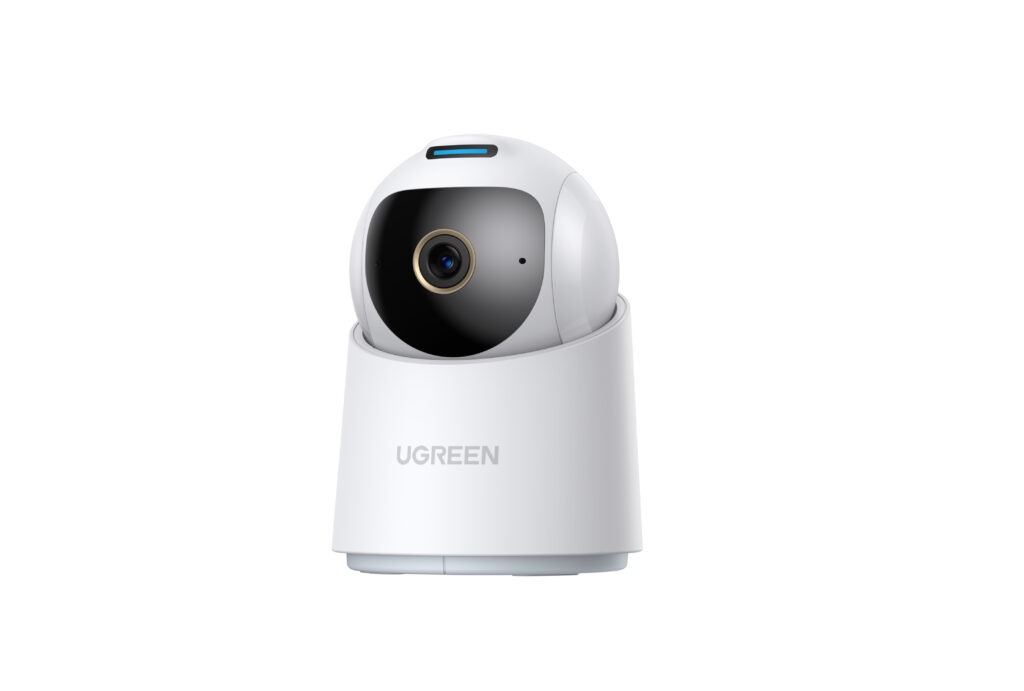
The SynCare Indoor Cam ID500 Pro is one of the companion cameras UGREEN provided for testing. It works with the HA100, letting users manage recordings and supported AI recognition features centrally through Surveillance Center. It’s also one of my favorite security cameras.
The camera features an 8MP 4K sensor with HDR imaging, 8× digital zoom, 360-degree pan, and 111-degree tilt control, according to the reviewer guide. It also supports dual-band Wi-Fi 6, night vision, AI motion tracking, and baby-cry detection.
HDR, or High Dynamic Range, preserves detail in scenes with both bright and dark areas. This helps when a camera faces a window or monitors a room with uneven lighting.
The ID500 Pro also includes a physical privacy shutter, something I appreciate on an indoor camera. Unlike simply turning off recording in software, a physical shutter visibly covers the lens when you need privacy.
Its more interesting capabilities come through integration with the HA100.
Surveillance Center uses local AI to detect events, generate summaries, and let users search recordings with keywords. Instead of manually reviewing a long timeline, users can search for supported objects or events associated with recorded footage.
The camera’s motion tracking can also follow people or pets within its supported range. However, AI detection isn’t perfect, and performance can vary with lighting, positioning, and the type of activity being recorded. It can also mistake a person for a pet, so the training and learning may need more time to improve.
At this stage, the ID500 Pro seems like a useful indoor companion to the HA100, especially with two-way talk so you can communicate without leaving the area, plus an alarm button you can press to notify or alert something nearby.
SynCare PoE Cam OD600 Pro: Outdoor Monitoring With Triple Cameras
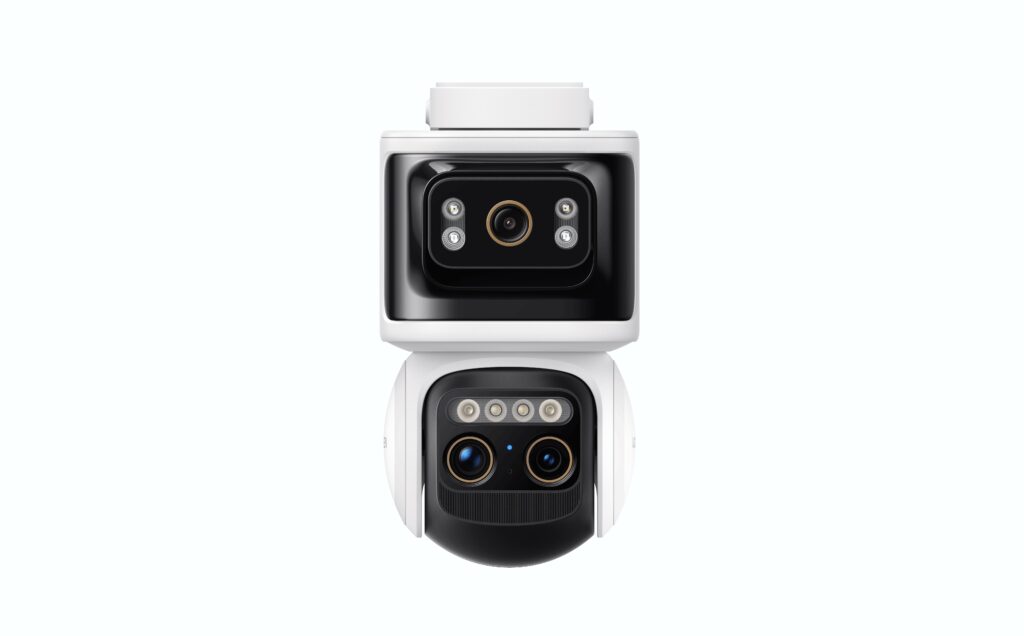
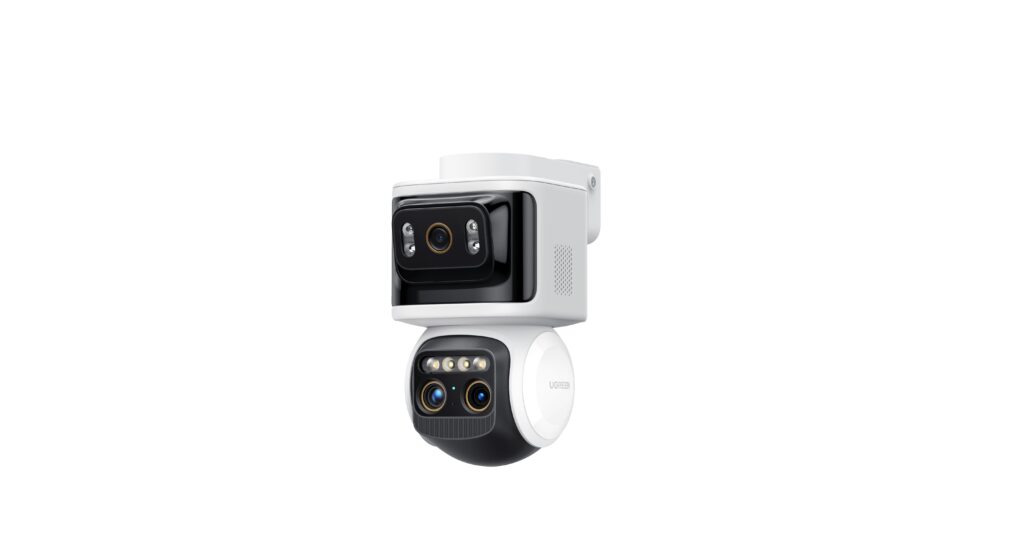
The SynCare PoE Cam OD600 Pro takes a different approach, focusing on outdoor monitoring with a triple-camera system.

It combines one 8MP 4K bullet camera with two 5MP PTZ cameras. PTZ stands for pan, tilt, and zoom, allowing compatible camera components to follow subjects and adjust their viewing direction.
UGREEN also advertises 9× hybrid zoom, intelligent motion tracking, starlight night vision, and a motion-activated spotlight.
The combination is interesting because it offers both a fixed viewing angle and adjustable cameras to follow activity. This could be useful for monitoring entrances, driveways, or larger outdoor areas where a single fixed camera may not provide sufficient coverage.
The OD600 Pro supports Power over Ethernet (PoE), allowing network data and electricity to travel over the same compatible Ethernet cable. This can simplify installations by eliminating the need for a separate power connection at the mounting location, although routing Ethernet cable may require more effort than installing a wireless camera.
It also supports 12V DC power and carries an IP66 weather-resistance rating, meaning its enclosure is designed to resist dust and powerful water jets. Additional security features include a siren advertised at 106dB and flashing lights intended to discourage unwanted activity.
Like the ID500 Pro, the OD600 Pro integrates with the HA100 for local recording, AI-assisted detection, event summaries, and supported keyword searches.
The triple-camera design is appealing, but its practical advantages will depend on subject tracking, image quality, nighttime performance, and detection accuracy. These areas deserve more extensive real-world testing before a final verdict.
Pricing, Value, and Early Impressions
UGREEN originally announced the HA100 at an MSRP of $1,799 but later reduced the suggested retail price to $1,599. The revised Super Early Bird price is $799, while the Early Bird price is $959.
For the companion cameras, UGREEN lists the ID500 Pro at an MSRP of $149 and a promotional price of $89, and the OD600 Pro at an MSRP of $269 and a promotional price of $159.
UGREEN’s announced promotion also makes qualifying customers who placed a pre-launch deposit for the HA100 eligible to receive an ID500 Pro camera after completing their corresponding purchase.
At $799, the HA100 isn’t inexpensive, especially when you factor in additional storage drives and cameras. However, it becomes more appealing if you plan to use it as a NAS, surveillance recorder, and local AI hub rather than buying separate equipment.
The biggest uncertainty is the software. Several features remain under development, and UGREEN continues to expand Uliya’s capabilities and the wider ecosystem.
Crowdfunding also introduces additional considerations, including delivery schedules, support, and the possibility of changes between pre-release samples and final retail hardware.
For that reason, I recommend evaluating the HA100 based on the capabilities available at purchase rather than assuming every announced feature will arrive exactly as envisioned. If you do make the purchase, I highly recommend buying the Smart Speaker as well to extend Uliya’s range.
Early Verdict
The UGREEN HomeAgent HA100 represents an interesting direction for local AI and smart-home management. By combining centralized storage, camera recording, AI acceleration, and voice interaction into one device, it addresses a real problem in increasingly fragmented smart-home ecosystems.
The SynCare Indoor Cam ID500 Pro and SynCare PoE Cam OD600 Pro also show how UGREEN plans to build around the HA100, offering indoor and outdoor surveillance with local storage and supported AI processing.
What stands out most is the potential convenience of having these technologies work together without requiring users to build and maintain several independent systems.
However, the software is still developing, and limitations in the current AI implementation mean more work is needed before the HA100 can deliver the complete experience UGREEN envisions. At this price point, UGREEN will need to go above and beyond to capture the consumer market and show people what it can do.
The hardware provides a compelling foundation, and the local-first approach is particularly attractive for users who value privacy and control over their data. But I am not ready to give the HA100 a final score while key features remain unfinished and the product is still pre-release.
I am neutral for now. As UGREEN continues updating its software and expanding compatibility, I look forward to seeing how the HA100, Uliya, and the two SynCare cameras evolve. If the company can deliver reliable automation, consistent AI recognition, and a polished user experience, the HomeAgent HA100 could become a practical alternative to managing multiple separate smart-home systems.